
System architecture
The Sharing Excess platform is organized in three layers: clients that people and integrators use, the Surplus app that enforces business logic and access control, and data stores that persist operational data and files. Browsers and MCP clients never talk to databases or object storage directly — every path goes through the app's authenticated server code.
Platform diagram
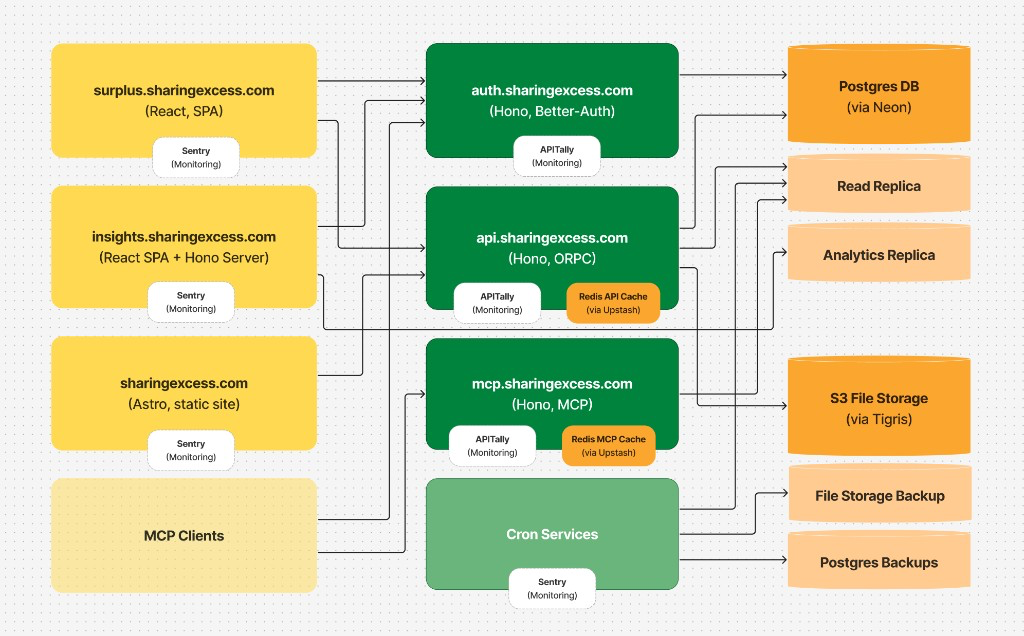
Reading the diagram
Clients (left) — entry points:
| Host | What it is |
|---|---|
surplus.sharingexcess.com | The Surplus web app — staff, drivers, partners; dashboards at /dashboards, the public impact map at /map, docs at /docs |
sharingexcess.com | Public marketing site (Astro) |
| MCP clients | Claude, Claude Code, ChatGPT, and Codex |
The Surplus app (center) — one application on one origin, surplus.sharingexcess.com, running on Cloudflare Workers and monitored with Sentry:
| Path | What it is |
|---|---|
| Pages | The web app itself |
/api/… | The app API — every read and write the web app makes |
/auth/… | Authentication — the only issuer of tokens: email sign-in codes for the web app, OAuth 2.1 for MCP clients |
/mcp | MCP server — read-only tools for admin and advisor accounts |
/files/… | Stored files — served only after checking the session or a signed link |
/public/… | A few public, read-only JSON endpoints for Sharing Excess's website (Find Food, impact numbers) |
| Cron jobs | Scheduled backups and cache warming, each on its own schedule |
Data (right):
| Store | Role |
|---|---|
| Postgres (Neon) | Primary database — writes and most reads |
| Read replica | Offloads list, report, and analytics reads, MCP, and crons |
| Analytics replica | Heavy analytical queries (the dashboards) |
| S3 storage (Tigris) | Uploaded files — served only through /files, after it checks the session or a signed link |
| Backups | Daily Postgres and file-storage copies to private buckets |
Redis (Upstash) sits between the app and data, as two separate instances: one for caches, rate limits, and distributed locks, and one for authentication (short-lived sign-in and authorization codes, refresh token chains, and its rate limits).
Trust boundaries
| Connection | How it's secured |
|---|---|
| Web app → app API and files | Session JWT in an HttpOnly cookie, on the app's own origin |
| Web app → Auth | Emailed sign-in code during login |
| MCP client → Auth / MCP | OAuth 2.1 Bearer token (admin and advisor) |
| App → data stores | Server-only credentials — never exposed to clients |
| Public marketing / docs / map | HTTPS, read-only |
See Access control and Infrastructure and operations.
Data flow highlights
- The web app signs in through
/authand calls the app API under/apifor operational data. Every call checks the session and the caller's access to the records it names before it runs, then reads or writes the primary database (and Redis/S3 when needed). - MCP clients authenticate through
/auth, then call/mcpwith a Bearer token. MCP tools are read-only and backed by the read replica. - Cron jobs run on a schedule against the databases, the cache, and backup storage; they do not serve user traffic.
- Dashboards dashboards read the analytics replica, never the write path.
Integration surfaces
| Surface | Best for |
|---|---|
MCP (surplus.sharingexcess.com/mcp) | AI assistants and read-only analytics tooling — see MCP integration |
App API (/api) | The web app's own calls; not a public API — see App API |
Next steps
- Domain model — entities you'll encounter in payloads
- App API — how the app's server calls work, and what integrators can rely on